
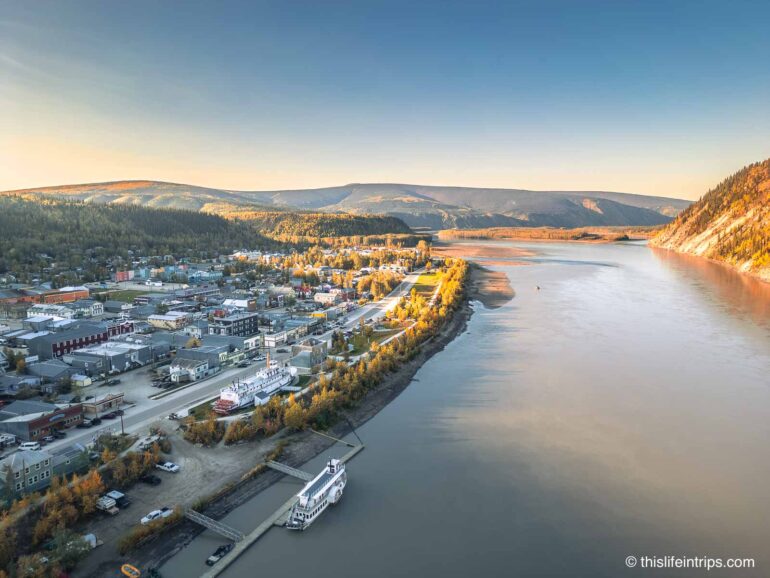
Today, cinematic storytelling does not require shooting everything frame by frame. One photo can also have this cinematic feel with a considered application. Pippit is an advanced AI video editor that provides broad functionality through which storytellers can deliver depth and motion from flat images, simulate cinematic pans, introduce parallax, and create active motion sequences for intros, travel reels, and short storytelling video clips.
By leveraging the combination of layered motion, parallax effects, and subtle camera-like motion, a flat, still image can appear to come alive right in front of us, drawing the viewer into the scene and enhancing the story in a valuable way.

Flat images often capture remarkable moments, but they often require an application of motion to transition from static memories. Once we add motion, the moments breathe and take on narrative energy. By layering the animation, we can suggest the forward motion of still images, suggest points of focus, and even create the impression that the viewer is gliding through space as a camera would. Pippit affords a professional cinematic feel to the flat images we layer to accomplish our projects without the camera effects or associated cost of an elaborate filming setup.
Understanding of parallax and depth simulation
Parallax is the principle whereby foreground and background elements move at different speeds to simulate depth. In a flat photograph, everything exists on the same plane. By digitally separating these layers and animating them at varied speeds, Pippit creates a faux 3D effect. Trees may drift slightly faster than mountains in the background, streets appear to stretch and recede, and lights slide past naturally, mimicking the way a camera would capture real-world movement.
More than aesthetically pleasing, this effect conveys scale and perspective. Subtle parallax creates a cinematic, calm feeling; pronounced motion emphasizes energy, adventure, or speed. The key is guiding the viewer’s eye naturally across the frame, helping them engage with the image as if they themselves were navigating through it.
Why cinematic pans work across genres
Cinematic pans have many applications: you may want to animate vacation shots for a travel vlogger to take viewers on a journey, use panoramic stills in your film’s opening or transition, or in the case of social media creators, animate uninteresting overhead photos into visually appealing reels since the moving image is always more captivating than a still, especially in social media contexts.
Each genre benefits in different ways. An animated static nature photo, urban explore, event coverage, or product shot is more engaging than a still image because it adds depth and energy to an already captivating composition and offers an immersive story with a single photo. Visual content becomes alive, memorable, and professional with motion.
Maximizing visuals for visual impact
Not all photos will be camera-ready for this use in an animation. Free video enhancer software can sharpen the details of an image, enhance its clarity, and increase its vibrancy to make the elements that are in motion feel more organic. Enhanced photos also provide texture, color, and detail within the layers in order to make parallax and camera motion more believable.
Motion in the animation can be a good way to draw attention to important elements of your imagery, such as motion on a person, landmark, or object. Subtle movements are natural mechanisms to direct attention to narrative. Combined with enhanced visual images, layered animation exemplifies the sequencing of visual content that is polished and cinematic.
Step-by-Step Guide: Making Cinematic Pan Illusions With Pippit
Pippit is a fast way to animate flat photographs
Step 1: Uploading images
Log in to Pippit or create an account. Look under the Video generator tab, and hit the Add media button to upload images from your computer or select another file storage location. If the image is hosted online, you can paste the image URL of your choice! Push the Generate button, and Pippit will analyze the image for layers and create a crude animation for your first viewing.

Step 2: Customize and Generate
Pippit creates a foreground and background layer so that you can decide how fast to simulate motion, the camera angle, and where you want pans to occur. Choose what type of video you want and enter your parameters, such as an AI avatar, voice, aspect ratio, language, and timing. Once you have added your parameters, press the Generate button, and Pippit will create scenery with a continuous cinematic panning effect, realistic depth, and parallax motion.

Step 3: Export video
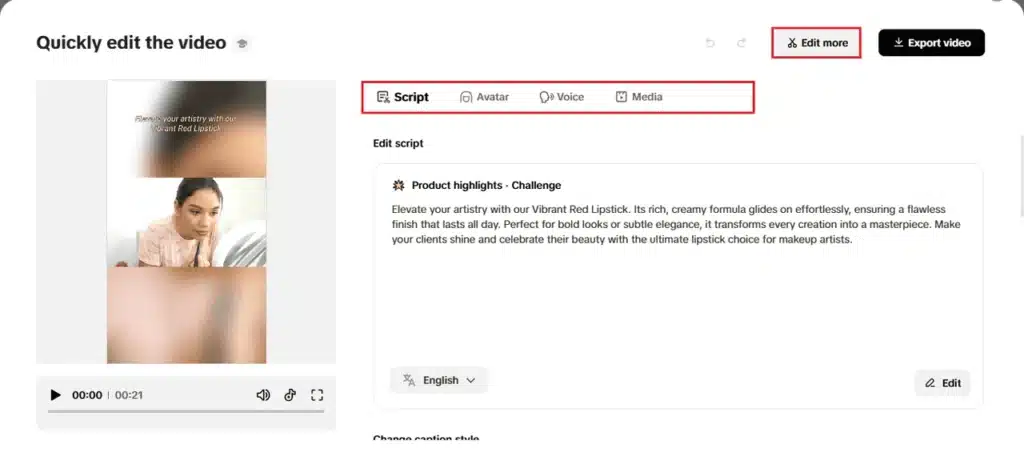
Preview the animation to check how smooth and interesting it is! If you want to make a quick edit, you can pan faster or slower, alter the focus points, or add captioning to the animation. If you’d like to do more detailed editing, then select Edit more.
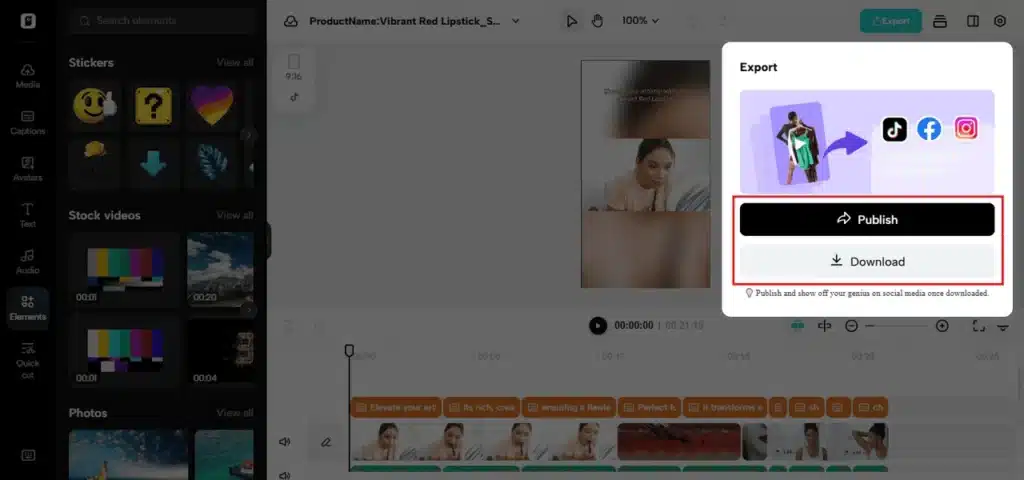
Once you are happy with your animation, press Export, and your high-resolution video will be ready for your social media post, cinematic intro, or reel documenting your travel adventure. The overall output is a simple process that takes flat photos into dynamic immersive experiences.
Why cinematic pan illusions matter
3D simulated movement is a powerful storytelling element. By turning a flat photo into motion, your photo grabs attention, keeps people watching, and inspires professional-grade imagery. Motion makes an audience stop watching and engage more, thus increasing shares and engagement. As a travel creator, filmmaker, or social media storyteller using Pippit’s Photo to video AI free tools, applying this technique can improve output without shooting anything new!
Parallax and camera motion from outside of the image also actively propel the viewer’s interest. Artists control the viewer’s lateral movement through motion of the photo’s layers, while foreground hesitations both emphasize importance and have the subtleties of the image hone the flow of the narrative. In brief, subtle depth combined with a well-executed pan makes flat photos feel alive and immersive.
Conclusion: Pippit brings photos alive.
Flat photos never have to be flat again. You can deploy 3D movement, parallax, and camera motion with Pippit’s video editor to execute cinematic pans for intros, travel reels, or documentation clips. You can create engaging narratives by enhancing your visuals, adding slight movement, and creating sequences that draw interest in any picture. All this started in Pippit today, so you have the potential to create immersive cinematic experiences leading to unforgettable content.
What say you?
Thoughts on these Pan Illusion tips?
Let’s hear it!